2021 Planner Ready-to-Use, Keynote: A Practical Asset for KDP Publishers and Personal Organizers
For self-publishers and digital creators, the search for a reliable, pre-formatted interior often feels like a choice between expensive custom design work or low-quality generic templates. The 2021 Planner Ready-to-Use, Keynote template bridges this gap by offering a professional, KDP-compliant foundation that serves two distinct audiences: entrepreneurs building a passive income stream through Amazon KDP and individuals seeking a customizable personal organization system. This 6x9 inch resource is not merely a static file; it is a functional starting point designed to streamline the publishing process or adapt to specific lifestyle needs without requiring advanced graphic design skills.
Understanding the Interior Architecture
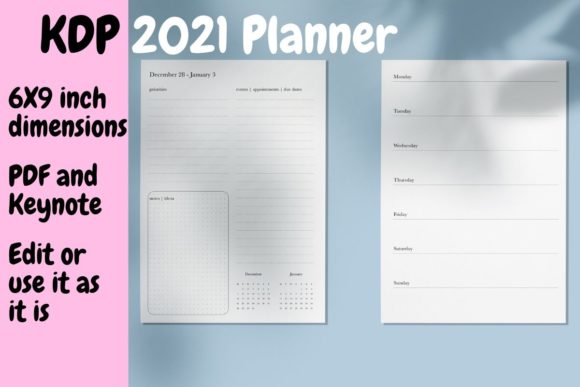
Before downloading or purchasing any planner template, it is essential to understand how the layout translates to actual usability. This specific 2021 dated planner consists of 114 pages optimized for black and white printing on white paper, keeping production costs at approximately $2.22 USD. This price point is critical for KDP sellers aiming to maintain healthy royalty margins while offering a competitive retail price.
The structure follows a logical flow that users expect in a premium planner:
- Title and Copyright Pages: Essential for establishing ownership and professionalism immediately upon opening the book.
- Three-Year Calendar Overview: Includes 2020, 2021, and 2022 spreads, allowing users to reference past events or plan future milestones beyond the current year.
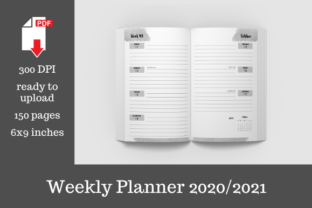
- Weekly Spreads: The core of the planner features two pages per week. The left page handles high-level organization with priorities, appointments, due dates, notes, and mini-calendars. The right page is dedicated entirely to daily TO-DO lists from Monday through Sunday.
- Back Matter: Three lined pages provide space for contacts, passwords, or miscellaneous notes.
This layout addresses a common pain point in planner design: the balance between structured scheduling and flexible task management. By separating appointments from daily tasks, the template prevents the cluttered look that often makes mass-market planners difficult to use effectively.
Real-World Applications for KDP Publishers
For marketers, bloggers, and small business owners using this as a commercial asset, the primary value lies in time efficiency and compliance. The file has been tested on the KDP previewer with no bleed settings, eliminating the guesswork involved in margin safety and gutter alignment. However, successful publishing requires more than just uploading a PDF.
Consider a freelance virtual assistant who wants to create a branded planner for their niche clients. Using the included Keynote template, they can easily insert industry-specific quotes, add their logo to the title page, or modify the "Priorities" section to read "Client Deliverables." Because the file is fully editable in Keynote, these changes take minutes rather than hours. For those without access to Apple’s Keynote software, the included ready-to-use PDF can be modified with free online PDF editors, ensuring accessibility regardless of your tech stack.
Crucial Workflow Tip: Always duplicate the original file before making edits. Whether you are adding illustrations or deleting note pages, maintaining a pristine master copy ensures you never lose the correctly formatted base document if an experiment goes wrong. This simple habit saves significant reformatting time later.
Personal Customization and Lifestyle Planning
Beyond commercial publishing, this template serves adults aged 20–50 who find standard store-bought planners too rigid. Educators, for example, might find the standard three note pages insufficient for lesson planning. With the Keynote file, they can right-click and duplicate the lined pages to create a 20-page grading tracker or student observation log. Conversely, a minimalist user might delete the back matter entirely to reduce bulk.
The weekly layout supports various productivity methodologies. Freelancers juggling multiple clients can use the left-page overview for project deadlines and the right-page daily list for time-blocking specific tasks. Students can utilize the appointment section for class schedules and the daily TO-DOs for study sessions and assignment breakdowns. The inclusion of the 2020 calendar is particularly useful for professionals tracking annual cycles, fiscal years, or recurring seasonal projects that require historical context.
Strategic Considerations Before Use
While the 2021 Planner Ready-to-Use, Keynote offers significant flexibility, users should approach it with clear intentions to maximize its value.
Evaluating Technical Compatibility
If you plan to edit the source file, verify that you have Keynote installed or identify a reliable PDF editor beforehand. While PDF editing is possible, it lacks the fluidity of working within the native Keynote environment. Text replacement and element movement are significantly smoother in the original format. If you are strictly using the PDF version for personal printing or digital tablet use, ensure your chosen annotation app supports the 6x9 dimension to avoid awkward cropping.
Assessing Content Relevance
The 2021 date makes this a niche product. For KDP sellers, this means targeting buyers looking for archival systems, historical tracking, or specific 2021 retrospectives rather than current planning. For personal users, this template is ideal if you prefer undated structures but want the framework of a dated planner, or if you are repurposing the layout for a different year by simply updating the calendar pages. The underlying weekly structure remains relevant regardless of the specific year printed on the cover.
Customization vs. Consistency
It is tempting to overhaul every page when given full edit access. However, excessive modification can disrupt the visual rhythm that makes a planner functional. Test your changes by printing a single week spread first. Verify that your added illustrations don’t push text into the gutter and that your font choices remain legible at 6x9 size. The goal is enhancement, not reinvention.
Maximizing the Value of Your Download
You will receive a single zip file containing both the Keynote source and the print-ready PDF. This dual-format delivery is intentional. The PDF serves as an immediate proof-of-concept and a backup option, while the Keynote file unlocks long-term adaptability.
For entrepreneurs, consider creating multiple derivatives from this single purchase. A fitness coach could adapt the daily TO-DO section into a workout log. A content creator could transform the priorities section into a social media content calendar. Each variation targets a different audience segment while leveraging the same professionally tested interior architecture.
For personal users, treat this template as a living document. Your planning needs evolve throughout the year. Having the ability to adjust page counts, add motivational elements, or restructure sections means your planner grows with you rather than becoming obsolete after a few months of mismatched usage.
Ultimately, the effectiveness of the 2021 Planner Ready-to-Use, Keynote depends on how intentionally you apply it. Whether you are launching a KDP product line or organizing your own chaotic schedule, success comes from aligning the template’s features with your specific operational needs. The tools are provided; the strategic application determines the outcome. By understanding the technical specifications, respecting the layout logic, and customizing thoughtfully, you transform a simple digital download into a powerful organizational or business asset.