KDP Interior: Beginner Recipe Book Template Guide
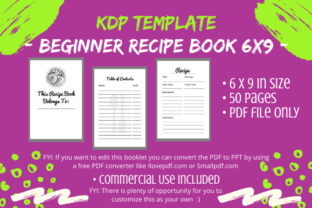
Launching a low-content publishing business often hinges on finding the right balance between professional design and accessible functionality. The KDP Interior - Beginner Recipe Book serves as a foundational asset for creators entering the culinary niche. This sleek, modern template is specifically engineered for Amazon’s print-on-demand ecosystem, offering a 6x9 inch trim size with no bleed. For entrepreneurs, bloggers, and hobbyists looking to monetize their passion for food organization, this digital product provides an immediate starting point without the steep learning curve of professional layout software.
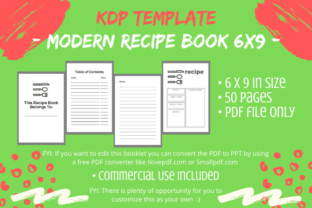
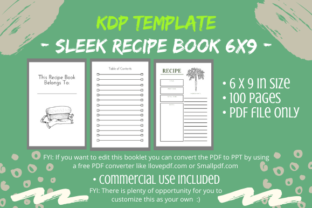
What makes this particular interior valuable is its structural completeness combined with its flexibility. It arrives as a single PDF file containing fifty pages of essential content architecture. Rather than staring at a blank canvas, you receive a pre-formatted skeleton that includes a title page, copyright page, four empty Table of Contents pages, multiple recipe entry pages, and dedicated notes sections. This structure addresses the most common pain point in self-publishing: formatting consistency. By adhering to standard KDP margins and sizing, the template reduces technical rejection risks, allowing you to focus on creative differentiation rather than measurement calculations.
Understanding the Technical Specifications
Before diving into customization, it is vital to understand the technical parameters of this asset. The 6x9 inch dimension is the industry standard for trade paperbacks, offering a portable yet spacious format for kitchen use. The "no bleed" specification means all text and graphics must remain within the safe zone, ensuring nothing gets trimmed during printing. This constraint actually benefits beginners by simplifying the design process; you do not need to worry about extending backgrounds or images to the edge of the page.
The included fifty-page count acts as a baseline. In the low-content book market, page count correlates directly with perceived value and royalty potential. However, fifty pages should be viewed as a minimum viable product. Successful publishers rarely upload a template exactly as received. Instead, they use this file as a master copy. It is strongly recommended to create a duplicate working file immediately upon download. Preserving the original pristine PDF ensures you always have a clean reference point for future projects or if your editing file becomes corrupted.
Editing Workflows for Non-Designers
Accessibility is a core feature of this KDP Interior - Beginner Recipe Book. You do not need Adobe InDesign or Affinity Publisher to modify this template. The product description highlights a practical workflow: converting the PDF to PowerPoint using free online tools. This democratizes the design process, allowing marketers, educators, and freelancers to leverage software they already understand.
- Conversion Accuracy: When converting PDF to PPT, check that text boxes and lines remain aligned. Free converters can sometimes shift elements by millimeters.
- Master Slides: Utilize PowerPoint’s Slide Master feature to apply global changes. If you want to change the font style across all recipe pages, doing it via the Master Slide saves hours of manual formatting.
- Safe Zone Verification: After editing, always export back to PDF and measure margins. KDP’s automated review will flag content that drifts too close to the gutter or outer edge.
Strategies for Originality and Market Differentiation
The most critical advice for using any pre-made KDP interior is to make it uniquely yours. Amazon’s algorithms are increasingly sophisticated at detecting duplicate content. Uploading this template without modification could result in your book being blocked or your account flagged. More importantly, customers seek unique solutions, not generic replicas. Your goal is to transform this beginner framework into a proprietary product that reflects a specific brand voice or niche focus.
Differentiation goes beyond simply changing the title. Consider the specific audience you intend to serve. A recipe book for college students requires different prompts and layouts than one designed for professional pastry chefs or meal-prepping parents. Use the template’s notes pages and TOC sections to add value specific to that demographic. You might add conversion charts, grocery list templates, seasonal produce guides, or dietary restriction trackers. These additions increase the utility of the book and distinguish it from competitors using similar base interiors.
Creative Adaptation Ideas
To truly own this KDP Interior - Beginner Recipe Book, consider these practical adaptation strategies that enhance user experience and protect your intellectual property:
- Niche-Specific Prompts: Modify the recipe pages to include fields relevant to your niche. For a keto cookbook, add macros and net carb sections. For a family heritage book, include space for "Story Behind the Dish" or "Who Taught Me This."
- Visual Branding: Integrate custom clip art, line drawings, or watermarks. Even simple geometric borders or consistent iconography can create a cohesive visual identity that separates your book from stock templates.
- Interactive Elements: Transform static notes pages into functional tools. Create rating systems, spice pairing wheels, or menu planning calendars. Interactive elements encourage users to engage deeply with the physical book.
- Inspirational Content: Sprinkle relevant quotes, cooking tips, or personal anecdotes throughout the interior. Breaking up the repetitive structure of recipe pages improves readability and adds personality.
Expanding Beyond the Fifty-Page Baseline
While the included fifty pages provide a solid start, successful KDP businesses often expand their interiors to offer greater value. The modular nature of this template allows for easy scaling. Because the design is sleek and minimal, adding new pages that match the existing aesthetic is straightforward. You can duplicate recipe pages to reach 100 or 120 pages, which often hits a sweet spot for pricing and spine width visibility on Amazon shelves.
Consider creating a series rather than a standalone product. The same base interior can be adapted for "Desserts Only," "Weeknight Dinners," "Smoothies and Juices," or "Holiday Baking." Each variation targets different search terms and customer needs while maximizing your initial investment in the template. Consistency across a series builds brand recognition; customers who love your layout for savory recipes will likely purchase your dessert version because they trust the user experience.
Quality Control and Final Preparation
Before uploading your customized KDP Interior - Beginner Recipe Book, implement a rigorous quality check. Print a test copy at home or order a proof from KDP. Digital screens can be deceiving regarding contrast, font size, and binding margins. A recipe book must be legible in various lighting conditions and durable enough for kitchen environments. Ensure that writing spaces are large enough for actual handwriting and that the gutter margin allows the book to lay flat or open easily without obscuring content.
Verify that your copyright page accurately reflects your modifications. If you have added significant original content, update the copyright notice accordingly. Clear attribution and professional metadata signal to both Amazon and customers that this is a legitimate, thoughtfully created product. Remember that the cover is not included with this interior; your cover design must visually promise the same sleek, modern aesthetic found inside. Cohesion between exterior and interior reduces returns and builds positive reviews.
Ultimately, this template is a launchpad, not a destination. Its true value emerges when you apply your unique perspective, knowledge, and creativity. By treating the KDP Interior - Beginner Recipe Book as raw material rather than a finished product, you build a sustainable publishing asset that serves real users while protecting your business from platform risks. The intersection of efficient production and genuine customization is where long-term success in low-content publishing lives.