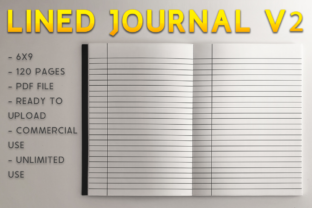
Lined Journal V2 KDP Template: Avoiding Common Publishing Pitfalls
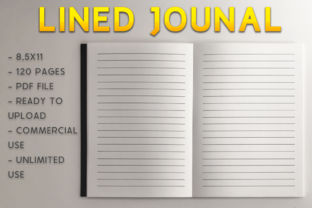
Creating a successful low-content book on Amazon requires more than just uploading a file; it demands precision in formatting and an understanding of print specifications. The Lined Journal V2 KDP Template serves as a foundational tool for publishers who want to bypass the tedious design phase and move directly to production. This specific 6″ x 9″ bleed design offers a standardized interior that meets professional printing requirements, but even a perfect template can yield poor results if applied incorrectly. Understanding the nuances of this 120-page PDF is essential for maintaining quality control and ensuring your final product looks as professional as traditionally published books.
Understanding Bleed vs. No-Bleed Specifications
The most frequent error encountered when using the Lined Journal V2 KDP Template involves misinterpreting the "bleed" setting during the upload process. This template is explicitly designed with bleed dimensions. In printing terms, bleed means the content extends beyond the trim line of the page. For a 6″ x 9″ journal with bleed, the actual PDF page size will be slightly larger—typically 6.125″ x 9.25″—to allow for trimming variance without leaving white edges.
If you upload this specific V2 template but select "No Bleed" in your KDP dashboard, the automated review system will likely flag your manuscript for errors. The system expects the content to fit within safe margins for a non-bleed book, but because this template includes extended artwork or lines reaching the edge, it violates those parameters. Conversely, attempting to use a no-bleed template while selecting the bleed option results in critical content being trimmed off during manufacturing. Always verify that your KDP project settings match the technical specifications of the downloaded PDF before initiating the previewer.
The Margin Safety Zone Misconception
Even when the bleed setting is correct, publishers often overlook the inner margin, or gutter, requirements. A lined journal intended for writing must have adequate space near the spine so users can write comfortably without their words disappearing into the binding. The Lined Journal V2 KDP Template accounts for this, but customization can introduce risks. If you decide to add headers, footers, or branding elements to this template, you must respect the safety zone.
For a 120-page book at 6″ x 9″, the minimum inside margin is typically 0.375 inches. However, practical usability suggests going wider. Many negative reviews for low-content journals stem from lines that are too close to the binding. When utilizing this template, treat the existing margins as a minimum baseline rather than a target. If you modify the master pages, ensure your text or decorative elements remain at least 0.5 inches from the gutter to guarantee a premium user experience.
Evaluating Page Count and Spine Width Implications
This template contains exactly 120 pages, a deliberate choice that balances cost-efficiency with perceived value. A common mistake among new publishers is altering the page count arbitrarily without considering the downstream effects on the cover. The spine width of a paperback is calculated based on paper type and total page count. Cream paper and white paper have different thicknesses (calipers), meaning a 120-page cream paper book has a different spine width than a 120-page white paper book.
If you remove or add pages to the Lined Journal V2 KDP Template to reach a round number like 100 or 150, you must recalculate your cover dimensions. Failing to adjust the cover template to match the modified interior page count results in a spine that is shifted left or right, creating an unprofessional appearance. Before modifying the PDF structure, determine your paper color preference and lock in your page count. Consistency between the interior file and the cover wrap is non-negotiable for passing quality assurance checks.
Paper Color Selection Strategy
While the template itself is agnostic to paper color, your choice significantly impacts the end-user's satisfaction. Standard lined journals generally perform better on cream paper for adult demographics, as it reduces glare and mimics traditional stationery. White paper is often reserved for workbooks, technical logs, or children’s activity books where high contrast is necessary. Using white paper for a personal reflection journal created with this template may lead to customer feedback citing eye strain or a "cheap" feel.
Review the line weight and opacity of the V2 template against both paper options. Darker lines may bleed through on cream paper if the stock is thin, while light gray lines might appear washed out on white paper. Although you cannot change the physical paper quality, selecting the appropriate tone enhances the utility of the pre-designed lines. Test prints or ordering a proof copy is the only way to validate this decision before launching.
Technical File Handling and Upload Integrity
Digital file management is another area where preventable errors occur. The Lined Journal V2 KDP Template is delivered as a ready-to-upload PDF, yet some users attempt to convert or edit it in incompatible software. Opening a print-ready PDF in word processing software can alter font embedding, shift line spacing, or corrupt vector graphics. These subtle changes often go unnoticed until the printed proof arrives with blurry lines or uneven margins.
- Avoid Re-saving: Do not open and re-save the PDF unless you are making intentional edits in professional layout software like Adobe InDesign or Affinity Publisher.
- Check Embeds: Ensure all fonts and graphics remain embedded if modifications are made. Unembedded resources cause substitution errors during printing.
- Validate Dimensions: Use a PDF properties reader to confirm the document size remains 6.125″ x 9.25″ after any editing session.
- Flatten Transparency: If adding overlays, flatten transparency to prevent rendering issues in the KDP previewer.
Metadata Alignment with Interior Content
Your product description and keywords must accurately reflect what is inside the book. A significant oversight occurs when publishers use generic descriptions that do not match the specific layout of the V2 template. If the template features college-ruled lines but the description claims wide-ruled, customers will return the product. Similarly, stating the journal has 150 pages when the template provides 120 creates distrust.
Accuracy builds authority. Describe the ruling style precisely (e.g., 7mm spacing vs. 8mm spacing) and mention specific features included in the V2 design, such as margin guides or date fields if present. Honest representation reduces return rates and improves long-term ranking stability. Search algorithms favor listings with lower return rates and higher engagement, making accurate metadata a critical component of SEO strategy rather than just a marketing formality.
Making Informed Decisions Before Publishing
Before committing to the Lined Journal V2 KDP Template, assess whether it aligns with your niche requirements. Not every audience needs a standard lined format. Some markets prefer dot grid, dotted lines, or specialized prompts. While this template is versatile, forcing it into a niche that demands structured layouts will result in poor conversion. Research competitor bestsellers in your target category to verify that standard lined pages are the expected norm.
Additionally, consider the competitive landscape. Because templates streamline production, many publishers use similar interiors. To differentiate your offering, focus on cover design and niche specificity rather than altering the functional interior. The value of this template lies in its reliability and compliance with KDP standards. Leverage that stability to experiment with external branding and marketing angles. By avoiding technical errors and focusing on strategic alignment, you transform a simple PDF into a sustainable asset for your publishing portfolio.